Frontend
Atomiq Dashboard
Atomiq comes with a modified ARTIQ Dashboard with a couple of extra features. It can be started by running
uv run atomiq_dashboard
source /path/to/your/venv/bin/activate && atomiq_dashboard
See here for more information.
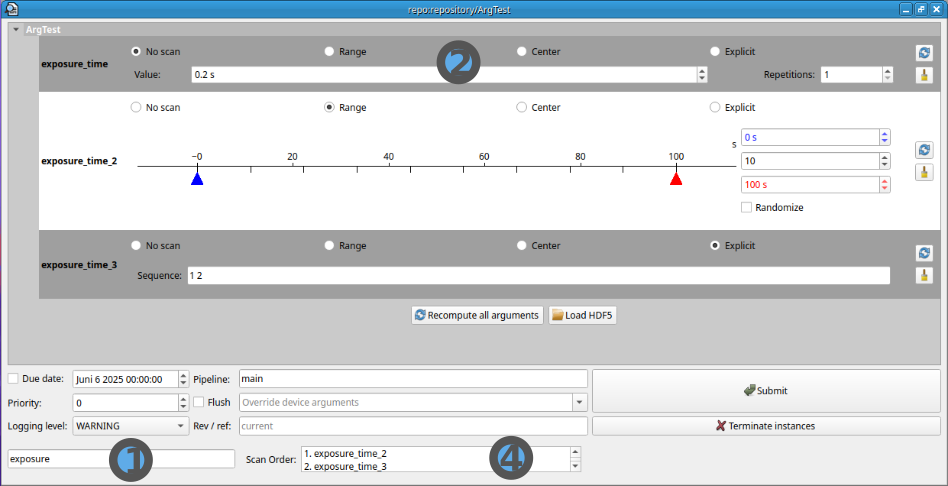
The dashboard works exactly the same as the stock ARTIQ one with the following extras:
Scannable parameters take up much less space when they are set to "No Scan".
Box to set the order in which parameters are scanned via drag and drop.
Sort by nameforces lexicographical ordering.Note
Then scan order is logged at the start of each experiment run. Arguments higher in the list (smaller values) are scanned first. This means in a scenario where
arg1 = 0,1; arg2= 10,11and arg1 is the first argument in the list, the scan points(arg1, arg2)are ordered as follows:(0,10) -> (1,10) -> (0,11) -> (1,11).Parameter search bar to search for experiment arguments.
Better scroll behaviour and alternating parameter row highlighting.
Troubleshooting
- The Dashboard quickly opens and then crashes without error
This is typically a sign of a broken dashboard state file. Backup and delete the
.pyonstate file. The dashboard will recreate it on the next launch.
Atomiq Master
Important
Note, that the master should be run in a docker container. Here you can find a tutorial how to do this. Running it on your host machine will mostl likely fail.
The atomiq master is a patched version of the ARTIQ master with the following additional feature:
It exposes infrastructure like the scheduler as HEROs for tight integration.
It improves the git experiment repository integration of ARTIQ. Learn more here.
It can be started by running
python -m atomiq.frontend.atomiq_master
ARTIQ master
usage: atomiq_master [-h] [--bind BIND] [--no-localhost-bind]
                     [--port-notify PORT_NOTIFY] [--port-control PORT_CONTROL]
                     [--port-logging PORT_LOGGING]
                     [--port-broadcast PORT_BROADCAST] [--ssl CERT KEY PEER]
                     [--device-db DEVICE_DB] [--dataset-db DATASET_DB] [-g]
                     [-r REPOSITORY] [--experiment-subdir EXPERIMENT_SUBDIR]
                     [-v] [-q] [--log-file LOG_FILE]
                     [--log-backup-count LOG_BACKUP_COUNT] [--name NAME]
                     [--log-submissions LOG_SUBMISSIONS]
                     [--heros-connect HEROS_CONNECT]
                     [--heros-realm HEROS_REALM] [--version]
                     [--git-autocommit]
Named Arguments
- --version
print the ARTIQ version number
- --name
friendly name, displayed in dashboards to identify master instead of server address
- --log-submissions
log experiment submissions to specified file
- --heros-connect
zenoh host to connect to for discovery of heros
- --heros-realm
heros realm in which the atomiq instance should live
Default:
'heros'- --version
Print the ATOMIQ and ARTIQ version numbers.
- --git-autocommit
automatically commit experiments to git on schedule
Default:
False
network server
- --bind
additional hostname or IP address to bind to; use '*' to bind to all interfaces (default: [])
Default:
[]- --no-localhost-bind
do not implicitly also bind to localhost addresses
Default:
False- --port-notify
TCP port for notifications connections (default: 3250)
Default:
3250- --port-control
TCP port for control connections (default: 3251)
Default:
3251- --port-logging
TCP port for remote logging connections (default: 1066)
Default:
1066- --port-broadcast
TCP port for broadcasts connections (default: 1067)
Default:
1067- --ssl
Enable SSL authentication: CERT: server certificate file, KEY: server private key, PEER: client certificate(s) to trust (default: None)
databases
- --device-db
device database file (default: 'device_db.py')
Default:
'device_db.py'- --dataset-db
dataset file (default: 'dataset_db.mdb')
Default:
'dataset_db.mdb'
repository
- -g, --git
use the Git repository backend (default: False)
Default:
False- -r, --repository
path to the repository (default: 'repository')
Default:
'repository'- --experiment-subdir
path to the experiment folder from the repository root (default: '')
Default:
''
logging
- -v, --verbose
increase logging level of the master process
Default:
0- -q, --quiet
decrease logging level of the master process
Default:
0- --log-file
store logs in rotated files; set the base filename
Default:
''- --log-backup-count
number of old log files to keep, or 0 to keep all log files. '.<yyyy>-<mm>-<dd>' is added to the base filename (default: 0)
Default:
0